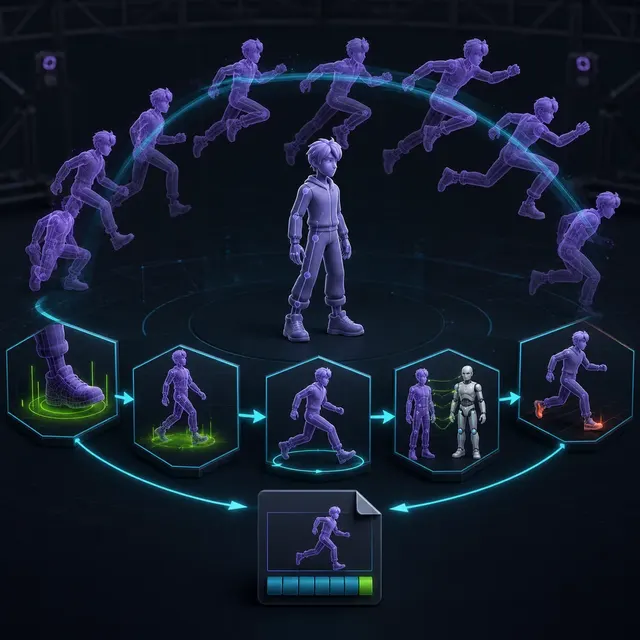
From generated joint sequence to gameplay animation
- Text-to-motion
- Motion diffusion model
- Animation retargeting
- Root motion
- Inverse kinematics
- Animation controller
A text-conditioned motion model
proposes joint poses and timing on a source body.
Retargeting and contact repair
adapt the motion to the production character.
An animation controller
integrates root motion, events, transitions and interruption rules.
Generated motion is data on a body model
Text-to-motion research such as MotionDiffuse and the Human Motion Diffusion Model generates sequences conditioned by language or actions, but a convincing preview may use a different skeleton, proportions, coordinate system or ground plane from the game character. Preserve the source prompt, model version and motion file. Identify joints, frame rate, clip length and whether translation is stored on the root, hips or neither before retargeting.
Retargeting reveals proportion and contact errors
Map the source to a clean reference pose and the production rig, then inspect shoulders, wrists, knees, spine and twist bones. Different limb lengths can create floor penetration, floating feet or missed hand targets even when joint rotations transfer correctly. Use constrained correction only after understanding the source; aggressive smoothing can remove timing and weight. Test a range of character proportions before approving a reusable clip.
Set the skeleton and deformation contract in the generated-character rigging guide, before diagnosing motion as an animation-only problem.
Gameplay needs transitions and ownership rules
Choose whether the clip drives root motion or the controller moves the character. Extract, retain or remove root translation consistently. Define entry and exit poses, blend windows, interruption rules and motion-warping limits. A jump, attack or traversal action also needs collision, events and gameplay timing aligned to the visible contact. Keep animation events authored and reviewable rather than inferring critical state from appearance at runtime.
Evaluate motion in context, not as an isolated loop
Check foot sliding, balance, joint limits, self-intersection, ground contact and repetition under the final character mesh. Then test transitions at game speed, on slopes, around obstacles and under variable frame rate. Compare several attempts from the same instruction to expose variation. Human review remains necessary for intention, readability and style even when positional or velocity checks are automated.
Retarget and compare three motion candidates
Generate or obtain three variations of one locomotion instruction. Retarget them to the same production character, mark foot contacts and compare root trajectories. Repair only one candidate, then test start, stop, turn, slope and interruption transitions in the controller. Record repair minutes, visible contact errors and the reason the selected clip fits the game's timing and style.
Character motion production decisions
Contains poses and timing from a named model
Maps motion onto the production skeleton
Adds root, events, contacts and tested transitions
AI-generated animation acceptance checklist
- Record the source prompt, model, skeleton and frame rate.
- Retarget from a verified reference pose.
- Repair feet, hands, balance and joint limits.
- Define root motion, events and interruption behavior.
- Test transitions and contacts with the final controller.
Questions about AI-generated character animation
Does text-to-motion output include a production rig?
Not necessarily. Research and tools may output joint sequences or use a reference body that must be mapped to the game rig.
Can foot sliding be fixed automatically?
Constraints can help, but ground height, speed, proportions and intended motion still need review.
Should attacks use generated timing directly?
Gameplay windows and events should be authored and tested explicitly, even when motion provides the starting performance.
Apply this asset production guidance
Build the deformation and skeleton contract with: Prepare a stable production skeleton first. Move stable technical rules into: Automate deterministic clip and naming checks. Motion quality and gameplay readability remain accountable human review decisions.
Primary sources & technical references
- MotionDiffuse official implementation and paperOpen source ↗
- Human Motion Diffusion Model project and paperOpen source ↗
- Blender ManualOpen source ↗
- Unity Manual: importing modelsOpen source ↗