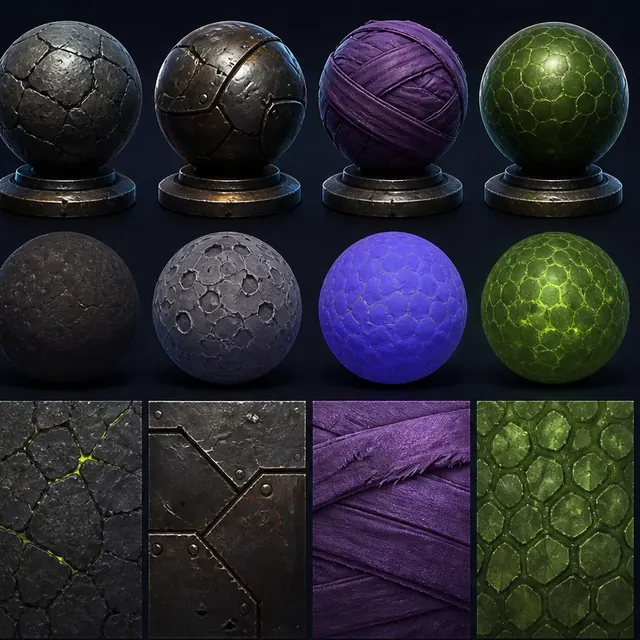
How PBR channels describe one material
- Physically based rendering
- Base color
- Roughness map
- Normal map
Base color
describes surface color without baked light.
Roughness
controls how wide or sharp a highlight looks.
A normal map
stores small changes in surface direction.
Separate appearance from illumination
Base color should describe surface reflectance without painted highlights or deep ambient shadows. When an image generator bakes dramatic light into color, the material reacts incorrectly under a moving engine light. De-light source images or generate under explicitly neutral conditions, then inspect on standard test shapes.
Keep channels physically coherent
Metalness usually represents whether a surface region is metallic, not how shiny it looks. Roughness controls highlight spread, while normals describe fine surface orientation. Deriving every channel from the same grayscale image produces correlations that look synthetic and may break material meaning.
Material approval depends on a stable surface; use the game-ready topology guide, when seams, normals or LODs cause visible errors.
Tiling needs structural review
A seamless boundary is not enough. Repeated distinctive knots, cracks or stains create visible frequency across large surfaces. Test at real scale on a broad plane, build macro and micro variation separately, and preserve texel density across the asset set.
Calibrate in the target renderer
Color management, normal orientation, channel packing and shader conventions vary. Document whether a pipeline uses metallic-roughness or another workflow, which channel direction is expected, and how maps are compressed. Compare under a neutral studio rig and representative game lighting.
Surface reference can come from an AI image generator, but a generated picture is a look reference rather than an albedo map, and it still has to be separated into channels before a material is authored.
Validate AI-assisted PBR texture channels
Apply the proposed material to a sphere, cube and large tiled plane under a neutral rotating light. Temporarily view base color, roughness, metalness and normals as separate channels. Look for painted highlights, implausible metalness, inverted normals and repeated landmarks. Finally move the material into a representative level; a material that survives only the preview sphere has not passed production review.
PBR material acceptance criteria
Reflectance without baked lighting
Microsurface response
Fine surface orientation
AI texture and PBR material checklist
- Remove baked highlights and shadows from base color.
- Validate metalness as a material property.
- Check normal orientation and intensity.
- Test tiling across a large surface.
- Confirm channel packing and compression in engine.
Questions about AI textures and PBR materials
Can AI generate a normal map directly?
It can propose one, but verify that details agree with color and height cues and that the engine uses the expected tangent convention.
What makes a texture seamless?
Opposite edges join without discontinuity and the broader pattern avoids obvious repetition at intended scale.
Should base color contain shadows or highlights?
Normally no. Base color should describe surface color while lighting and reflections come from the renderer. Baked illumination can fight changing game lights.
Apply this asset production guidance
Before choosing map sizes, calculate their upper-level memory footprint: Estimate texture memory for the asset. For an Unreal project, carry the reviewed channels into: Integrate reviewed materials in Unreal Engine. The renderer test should use the project's actual compression, packing and master materials.
Material maps travel inside a format, so compare glTF, FBX, OBJ and USD for material handoff, before choosing an export path.
Primary sources & technical references
- Khronos glTF specification and resourcesOpen source ↗
- Blender ManualOpen source ↗
- Unity Manual: importing modelsOpen source ↗
- Unreal Engine documentation: importing contentOpen source ↗